
How Pippit’s Crop Video Tool Keeps Your Ads Platform-Ready
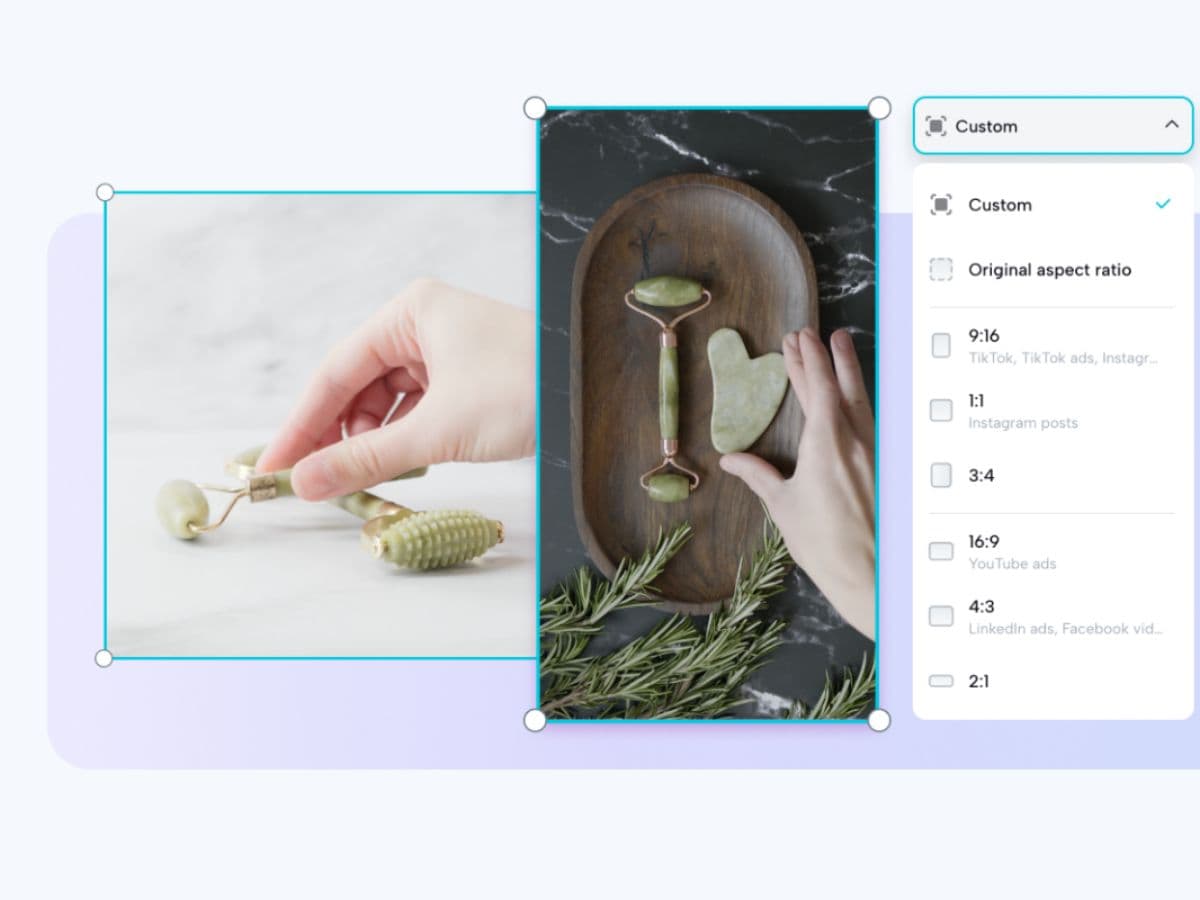
You spent hours filming a video to showcase your product. The lighting is perfect, the message is clear, and the energy is right. But when you upload it to Instagram, half of the product disappears from the frame. Suddenly, the polished video you were proud of doesn’t look so professional anymore.
This happens more often than most creators or businesses realize. Each social media platform has its own video requirements, from aspect ratios to display sizes. Something that looks fantastic in your phone’s camera roll can look awkward and unprofessional once it hits a feed. And in a world where people scroll in seconds, bad framing can mean your ad is ignored before the message even lands.
That’s where Pippit’s crop video tool changes the game. It doesn’t just cut clips; it ensures your ads look professional, polished, and platform-ready. By handling the technical details, Pippit frees you to focus on what really matters your message and your story.
Why framing decides whether people stop or scroll
When people scroll through TikTok, Instagram, or YouTube, they’re not just watching they’re judging. A centered, well-framed video feels intentional and polished. A poorly framed one, where faces are cut off or text disappears, feels rushed and unprofessional.
Framing is more than aesthetics; it communicates quality. And quality builds trust. A sloppy frame sends the wrong signal about your brand or product, while a clear, balanced video shows attention to detail. The best part? You don’t need to re-shoot your content. You just need the right crop for each platform.
Why multi-platform ads create hidden headaches
Modern businesses can’t rely on a single channel. They need ads running on Instagram, TikTok, Facebook, and YouTube simultaneously. The problem is that each platform has its own preferred ratio:
-
9:16 for TikTok and Instagram Reels
-
1:1 for Instagram feed posts
-
4:5 for Facebook ads
-
16:9 widescreen for YouTube
If you’re working without automation, this means manually editing and exporting the same video over and over again. It’s tedious, time-consuming, and prone to mistakes. For solo creators or small teams, it’s overwhelming. For agencies handling multiple clients, it’s nearly impossible to scale.
This is exactly the challenge Pippit set out to solve.
Step by step: how to crop video with Pippit
Pippit’s Smart Crop tool is designed to make framing effortless. Here’s how it works in three simple steps:
Step 1: Upload your videos
Log into Pippit and navigate to the Video generator tab. Select Smart crop and click “Upload” to add your clips. Choose from your device, cloud storage, or local assets. Uploads are quick, so you can jump straight into editing.
Step 2: Crop your videos
The Smart crop feature automatically adjusts your clip to the correct aspect ratio 1:1 for Instagram, 9:16 for TikTok, or 16:9 for YouTube. Prefer more control? You can manually crop specific sections to highlight your product or key details. Either way, Pippit ensures precision without sacrificing quality.
Step 3: Export your videos
Preview your cropped video to make sure it looks exactly how you want. Select your resolution and format, then click Export. You can download the file or publish it directly to Instagram, YouTube, and other platforms all are all in one go.
In less than five minutes, raw footage becomes platform-ready content.
Cropping is storytelling in disguise
Cropping isn’t just about resizing. It’s about directing attention to the details that matter most. Maybe it’s your product in focus, an important facial expression, or an on-screen text overlay. The way you frame a video shapes how the story is received.
This is why tools like Pippit aren’t just time-savers they’re storytelling partners. Clean, intentional framing makes your message easier to absorb. And the easier it is to understand, the more likely it is to stick.
How Pippit’s tools work together for creators and brands
Cropping is powerful on its own, but it becomes even more impactful when paired with Pippit’s other features:
-
The AI lyrics generator automatically syncs lyrics to audio, making videos more engaging for musicians and content creators.
-
The ad maker allows businesses to design professional, scroll-stopping ads without hiring costly agencies.
-
Together with the crop video tool, these features give you a complete workflow that’s fast, easy, and professional.
Instead of juggling multiple apps or waiting weeks for edits, you can create, polish, and publish everything inside Pippit. That means less stress, more consistency, and better results.
Why platform-ready ads build trust with your audience
Viewers may not consciously notice when a video is perfectly framed, but they definitely notice when it isn’t. A TikTok ad that fills the screen naturally feels authentic and professional. A video that looks cut off or squeezed feels awkward and untrustworthy.
Consistency builds recognition. When every ad you publish looks sharp and tailored for the platform, people begin to trust your brand. They associate your content with quality, and over time, that trust leads to clicks, engagement, and sales.
Time saved is growth gained
At the heart of it, Pippit saves time. Manual cropping eats up hours, while Smart crop gets it done in minutes. Those hours can be reinvested into strategy, storytelling, and campaign testing.
The faster you can turn around content, the quicker you can jump on trends, test new ads, and stay ahead of competitors. In a fast-moving digital world, that speed is everything.
In Short: From raw clips to platform-ready ads
The difference between a raw video and a polished ad often comes down to framing. With Pippit’s crop video tool, you don’t just resize content you elevate it. You gain speed, polish, and consistency, all of which directly impact how your audience perceives your brand.
And when you combine it with Pippit’s AI lyrics generator and ad maker, you get an all-in-one toolkit for creating ads that feel professional, look polished, and reach your audience without friction.
Pippit helps you spend less time fixing frames and more time growing your brand. That’s the edge creators and businesses need today.